
Lua Tips and Tricks (and Snippets)
Heyo! Nice to see that there has been a new section added to the forum. I thought I'd kick off this subsection with a little Tips and Tricks thread so we can all spread our knowledge with our love for Lua. I saw someone (Maybe Luna?) do something like this for PHP a long while ago and I actually learned a handful of useful things, so thought "what the heck", I might as well contribute too in some way.
I encourage anyone and everyone to spit their mad Lua skillz in this thread. I'm always up for learning new methods, so why not share them? :P
Table Indexing
This is a pretty basic thing, but if you're learning Lua this may turn out to be really useful for you to know early. If your table is structured in a specific way, you can often check data through the index to save those valuable server resources. It is easier to explain in an example.
Example:
Bad method:
Good method:
Conditions when setting vars/args
There is probably some fancy name for this but I'm not aware of what it is, so if there is one please let me know :P
I only just recently started using this in my day to day coding, but it's something I should have been using for a long while. You can use advanced conditions when you're setting variables. For example, you may know about the or operator. Well you can take that a step further as shown in the examples
Example:
Bad method:
Good method:
Prevent deep if embedding
Something that I did all the time when I was learning is find myself in deep if statements. With functions I'd stack if statements instead of listing them. It can be much easier to read code when it's neatly laid out and not heavily embedded.
Example:
Bad method:
Good method:
DistToSqr over Distance
When checking distances, in most cases you can use :DistToSqr. It is much faster and a better optimization method than using :Distance. It can be easy habit to just use :Distance, but you should be using :DistToSqr as much as possible. Keep in mind that the value it returns is much higher than :Distance, so it will take a little fiddling to find a nice value that works well for you. But it should be used in most cases over :Distance.
That seems about all I can think of off the top of my head. Again, I encourage you to share your best practice methods here too. People can't learn if you're not willing to teach them! Please also don't be a cunt in the replies, gotta spread the love!
Circles Functions
Here is my attempt at circle functions, arc functions and segment functions. I'm not very sure how good these functions are in terms of efficiency compared to what's already out there but I'll post this anyway. If for whatever reason my functions are inefficient compared to perhaps bobbleheads functions please let me know why and post their functions (with permission) for people to use over mine.
This is a bog standard circle, nothing too different from the one on the wiki but this has the ability to be cached to avoid doing calculations every frame when possible although that would only work for static elements. For dynamic elements that need to be recalculated every second, cache should be set to false and the function should be called within the drawing function.
This is a simple rendition of an arc, there aren't many checks inside the function so it might be error prone if you're using it incorrectly. Same thing with the cache as before. Side note, startAng always needs to be smaller than endAng.
This is what I call a sub-section, not sure what they're really called. Same thing with cache as before.
Here's a little example of how to draw things after caching them as it isn't really immediately obvious.
I 100% recommending using the cache feature as much as you can as doing all these calculations every frame can injure FPS.

Optimising Materials and Colors in HUD/rendering hooks
Example of badness:
Example of goodness:
Yeah but why
Because DrawHUD is called every time the game renders a frame; therefore, in the badness example you are creating a new Color object and a new Material object every frame, which fills up memory, slows down framerate, and hurts the garbage collector's performance.
If you ever find yourself looping through ply.GetAll() or ents.GetAll() when trying to find an entity of a certain class or with a certain attribute, try keeping them in your own table by putting them into your table on spawn/initialise to reduce the amount of checks that have to be made. For example lets say I want to check whether or not a player is near all entities with the class 'health_station' instead of doing
which loops through all the entities on the map (ents.FindByClass() does the same thing)
you should add the entity to your own table when it is created, for example
and then to loop through it you do the same thing but with our new table
Yeah but why
A simple flatgrass world with nothing in it can still have around 90 items in the ents.GetAll() table, now if you have a server with 64 players all building with a small prop limit of 20 and there are three health stations around the map, that would be up too 1390 items that have to be checked per player meaning there would be 88,960 checks done as a worst-case scenario assuming there's nothing else on the map. Looping through the 1390 items is very expensive and inefficient, especially if you're doing it every frame or every tick. However if you use the other method and store your items in their own table, you'd only have to check through three items per player meaning you've gone from 88,960 checks to a measly 192 checks which can be a lot better for both clients and servers performance.
Conditions when setting vars/args
There is probably some fancy name for this but I'm not aware of what it is, so if there is one please let me know :P
This is called a ternary operator, and there's not a native one in Lua. Using it with a && b || c "fakes" it because of how the operator coalescing works, but it can behave a bit finicky when b is false and a is true - it will give you c. To solve this, GLua provides you a bit of a lengthier Either(a, b, c) function that works properly without the aforementioned issue. You can also just inline an if statement in an immediately-invoking function expression like so, but you generally shouldn't do this unless you have a reason for it: (function() if(a) then return b else return c end end)()
Stickied the thread.
Will probably also use it for the new knowledge base category Script Submissions.
DONT USE PAIRS ON SEQUENTIAL TABLES!!!!!!! @Ben
Use re-usable components!
Recently I've noticed a lot of people still use default Derma panels and at best override their paint. To fix this problem you can either use a ui library like Pixel Ui and Nexus Library or you can create your own components and use them.
This is a panel I made as an example, the comments should explain everything.
local PANEL = {}
// This can be used to change the default values of the panel
AccessorFunc(PANEL, "Bool", "Bool", FORCE_BOOL)
AccessorFunc(PANEL, "String", "String", FORCE_STRING)
function PANEL:Init()
// This is called when the panel is created
// use this to create base elements and variables
self:SetBool(false)
self:SetString("This is the accessor function from above")
print(self:GetBool(), self:GetString())
self.examplePanel = self:Add("DPanel")
self.examplePanel:Dock(TOP)
self.examplePanel:DockMargin(5, 5, 5, 5)
self.examplePanel.Paint = function(pnl, w, h)
draw.RoundedBox(6, 0, 0, w, h, Color(40, 42, 49))
end
end
function PANEL:Think()
// This is called every frame
end
function PANEL:PerformLayout(w, h)
// This is called when the panel is resized
self.examplePanel:SetTall(50)
end
function PANEL:Paint(w, h)
// This overrides the default paint function (only of the main panel)
draw.RoundedBox(6, 0, 0, w, h, Color(24, 25, 29))
end
vgui.Register("ExamplePanel", PANEL, "DPanel") // ExamplePanel is the name of the panel, PANEL is the table we declared above and DPanel is the base panel we are inheriting from
// Example usage
// Note you can use this element in any other panel as much times as you want
concommand.Add("open_example_panel", function()
local frame = vgui.Create("DFrame")
frame:SetTitle("Example Frame")
frame:SetSize(300, 200)
frame:Center()
frame:MakePopup()
local examplePanel = vgui.Create("ExamplePanel", frame)
examplePanel:Dock(FILL)
print(examplePanel:GetBool(), examplePanel:GetString())
examplePanel:SetBool(true)
examplePanel:SetString("Showing that the accessor functions can be accesed and changed here")
print(examplePanel:GetBool(), examplePanel:GetString())
end)
How it looks when opened:
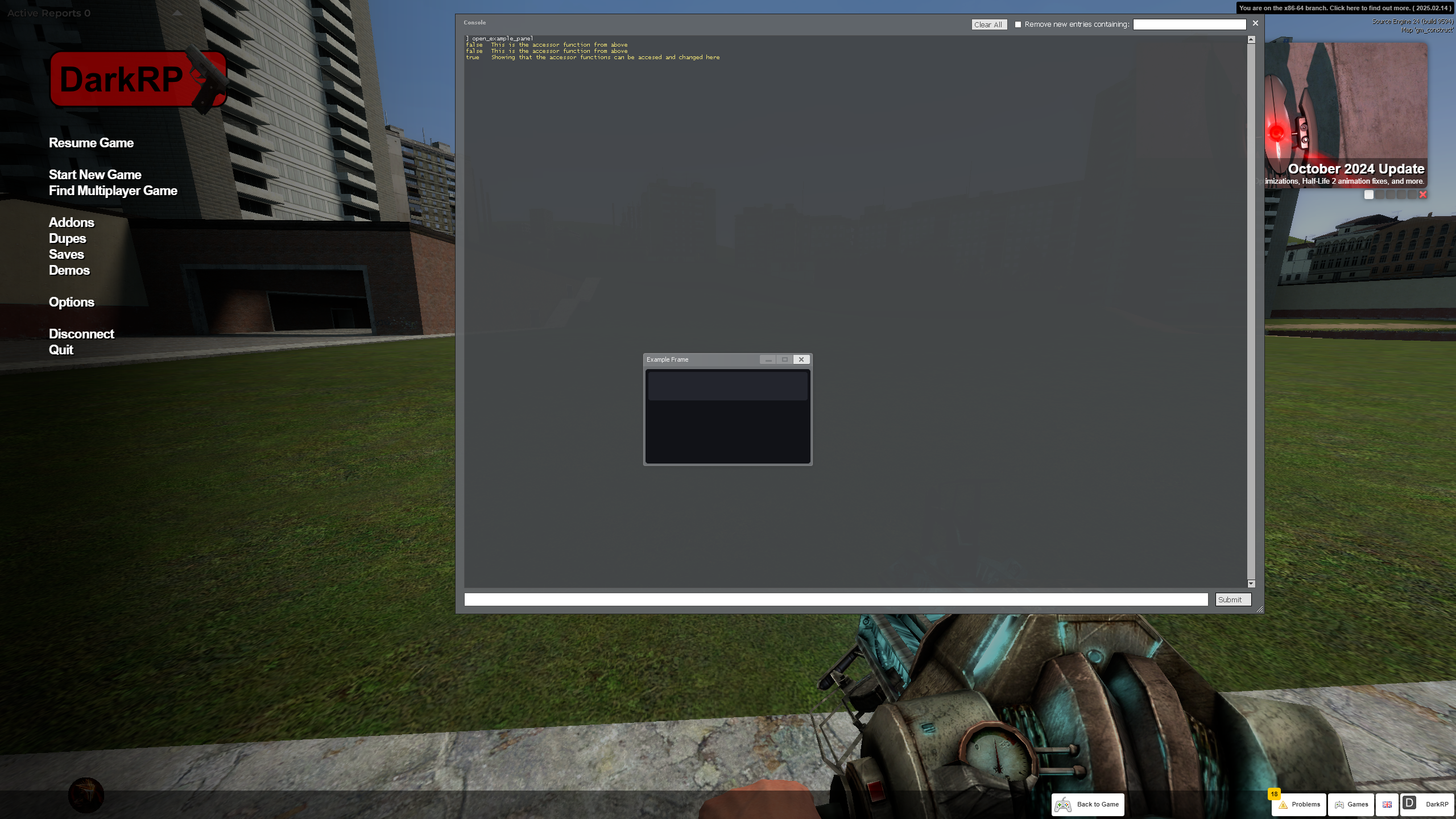
I hope this was helpful, but if you still don't understand something here is a wonderful video made by xenin on the topic:
https://youtu.be/aChXeLsLtfQ?list=PLxIHL2TEXiCeFgCo2ormzzd9cw5xWF_Gq