

Complete overhaul of the User Interface. Every menu is replaced. New Offline player viewer (Only players that have joined since this version will be shown) Some other code optimizations.
In version 3.4 I removed the backwards upgrade compatibility for very old versions directly to version 3.4. This included the Free Version. I removed this because I couldn't find a decent way to check the SQLite/MySQL tables for the new column so when I added it, it would throw errors (harmless errors) when the server started up and people were complaining about that... for whatever reason... even though it didn't do anything and no errors after start. I figured anyone updating from the Free version could just download and install version 3.3 and then upgrade to 3.4 if they wanted to. I posted these as instructions but no one saw them apparently because I get tickets EVERY SINGLE DAY asking why it doesn't work...
So.. I just spent some quality time and fixed it for real.
I re-added backwards upgrade support, but I did it properly this time. No errors, seamless.
Other than that... nothing was changed.
if you already have version 3.4 and it works.. no need to get this update.
AS ALWAYS, IF YOU UPDATE TO THIS VERSION BE SURE TO BACK UP ANY CHANGES YOU HAVE MADE TO YOUR SETTINGS FILES AND REPLACE THE SETTINGS ONCE YOU UPDATE. DO NOT JUST COPY THE OLD FILES OVER THE NEW, MAKE SURE YOU PASTE IN THE SETTINGS INTO THE NEW FILES. Sorry for the inconvenience.
This version adds 1 new feature
- Right clicking on a warning row in the GUI will allow you to warn that player. This will allow for you to warn an offline player while viewing their warnings through the GUI.
Removed a part of the code that was designed to allow for backwards compatibility for a version released a year ago. This streamlines new installations and prevents some warning error messages from displaying in the console of existing users. See the note below about updating your installation.
Note on Updating: If you are currently on a version prior to 3.0.3 you will first need to install 3.0.3 or later before updating to 3.4. You can NOT upgrade from a version < 3.0.3 directly to 3.4 due to the compatibility layer being removed in this version.
AS ALWAYS, IF YOU UPDATE TO THIS VERSION BE SURE TO BACK UP ANY CHANGES YOU HAVE MADE TO YOUR SETTINGS FILES AND REPLACE THE SETTINGS ONCE YOU UPDATE. DO NOT JUST COPY THE OLD FILES OVER THE NEW, MAKE SURE YOU PASTE IN THE SETTINGS INTO THE NEW FILES. Sorry for the inconvenience.
- Much requested feature: Now with the ability to view offline player warnings.
Simply click the "Offline Player" button, type in their steamid, and view their warnings as if they were online. you can do all of the things in the menu you could with online players such as right click to remove individual warnings and copy to clipboard.
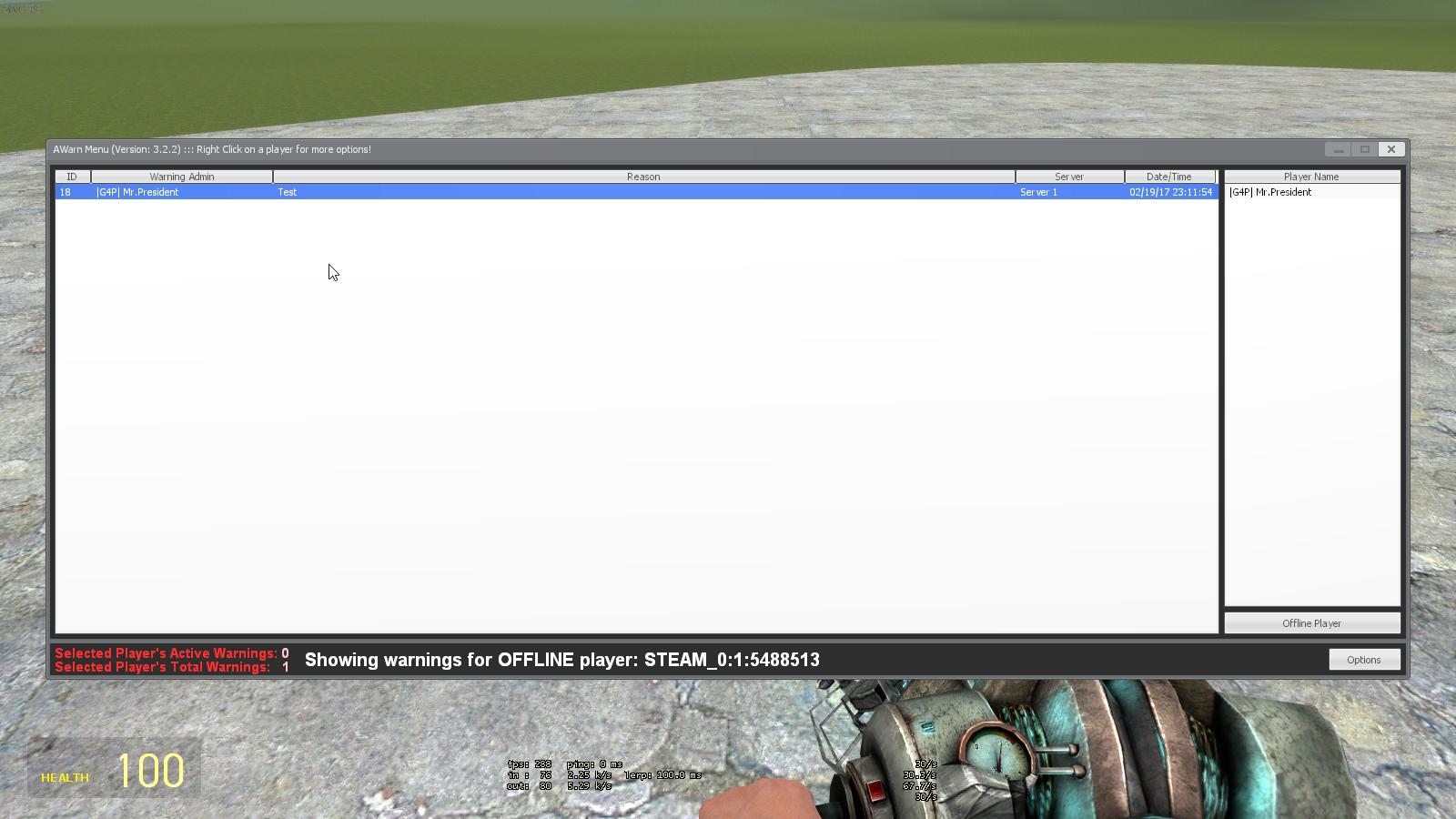
This version also adds support for 3 new localizations!
- Russian (RU) - Translation provided by Snappi (http://steamcommunity.com/id/snappi_incognito/)
- French (FR) - Translation provided by Driven (http://steamcommunity.com/profiles/76561197986344922)
- Portuguese (PT) - Translation provided by Comedian (http://steamcommunity.com/id/comedinha/)
AS ALWAYS, MAKE SURE YOU BACKUP YOUR SETTINGS FILE AND MYSQL CONNECTION DATA IF YOU USE MYSQL. IN THIS UPDATE THERE WAS AN UPDATE TO THE awarn_sql.lua FILE SO DON'T JUST REPLACE THE NEW FILE WITH YOUR BACKUP, GO INTO THE FILE AND EDIT THE CONNECTION INFO AGAIN ONCE YOU UPDATE.
- Added support for French and Russian localizations. These were done by me with Google Translate, so PLEASE if you speak French or Russian and fix it up, send me the update and I'll fix it on my end and give you credit.
- Added a group and user blacklist feature. Both of these need to be configured in the awarn_settings.lua file. Users in the user blacklist can not be warned by any player. Groups in the group blacklist can not be warned by anyone. The group blacklist feature only works for players who are online when someone trys to warn them. If you want to prevent offline warning of players, you'll still need to add them to the user blacklist by steamid.
AS ALWAYS, IF YOU USE MYSQL FEATURE MAKE A COPY OF YOUR SQL CONFIG SO YOU CAN REENTER IT AFTER YOU UPDATE.
ADDITIONALLY, IF YOU ARE USING CUSTOM PUNISHMENTS IN YOUR awarn_settings.lua FILE THESE WILL BE OVERWRITTEN AS WELL WHEN YOU UPDATE. MAKE A COPY OF YOUR CUSTOM PUNISHMENTS SO YOU CAN PASTE THEM BACK INTO THE FILE. NEW THINGS ARE ADDED TO THIS FILE, SO DO NOT SIMPLY OVERWRITE THE NEW FILE WITH YOUR OLD FILE, YOU'LL NEED TO PASTE INTO THE FILE.
Added 3 new localizations
This is the only thing added in this update, so it's not necessary to update from 3.2 to 3.2.1 if you don't want or need any of these languages.
Finnish (FIN) - Translation provided by [SPR] Hodas (http://steamcommunity.com/id/Hodas/)
Turkish (TR) - Translation provided by saviorsoldier (http://steamcommunity.com/profiles/76561198057034162)
German (DE) - Translation provided by Martin (http://steamcommunity.com/id/martin_link/)
AS ALWAYS... IF YOU USE THE MYSQL FEATURE, THIS WILL OVERRIDE YOUR SETTINGS. BE SURE TO MAKE A BACKUP OF THE TOP OF THE awarn_sql.lua FILE SO YOU CAN REDO YOUR SETTINGS AFTER UPDATING.
Due to popular demand, I've added support for language localization. All text messages in the addon are now compiled into the sh_localization.lua file.
Open up the file and edit the strings to your liking. If you want to add completely new languages, follow the direction in the file.
Essentially, copy and paste the table to create a new one, change the language code for your new table and edit away!
If you do a translation, please send it to me and I'll include it officially and give you credit on the main page and in the code.
AS ALWAYS... IF YOU USE THE MYSQL FEATURE, THIS WILL OVERRIDE YOUR SETTINGS. BE SURE TO MAKE A BACKUP OF THE TOP OF THE awarn_sql.lua FILE SO YOU CAN REDO YOUR SETTINGS AFTER UPDATING.
Cheers!
- Fixed a bug that was causing an error in console which was also causing some unwanted behaviors due to the error stopping some other functions from being run. I'm sorry to post an update so soon after the last one.
Please remember to backup your awarn_settings.lua file before updating so you can paste it back in. This is the file that has all of your warning punishment settings.
Also, if you use MySQL, you'll need to reenter your server info at the top of the awarn_sql.lua file after updating.
- Fixed a bug with warnings not displaying correctly for warnings given to offline players.
- Changed how threshold punishments are handled. Instead of only having one kick and one ban threshold, you can customize as many as you like. Example: You can kick at 3,4, and 5 warnings, then temp ban at 7, 9 and 12, then at 15 warnings you can have it permanently ban the player. This is totally customizable in the addons/awarn2/lua/awarn/modules/awarn_settings.lua file.
AS ALWAYS, IF YOU ARE USING THE MYSQL FEATURE, MAKE SURE YOU REENTER YOUR MYSQL CONNECTION INFO INTO THE AWARN_SQL.LUA FILE AFTER UPDATING!!
- Added server field to database so that communities running multiple servers using the same AWarn2 database can tell which warnings came from which server. You can edit your server unique tag in the awarn_sql.lua file (The same place you input your MYSQL server information). Servers not using the MySQL option, need not worry about this. -Added a new server convar to disable the ability to warn other admins. NOTE: Awarn2 doesn't recognize rank hierarchies that some admin mods use, so if you disable admin warning, it will disallow ALL admins (or anyone who has the ability to warn) from warning any other admin. There is no way (nor do I plan on adding a way) to disable some groups from warning other specific groups. -Modified the menu to adjust for the user's resolution. This will allow players with larger monitors to see more of the warning texts.
NOTE: If you upgrade to this version and are currently using the MySQL option, you will need to re-input your server information into the awarn_sql.lua file once you update. Make note of your settings so you can input them into the new updated file.
- Fix for TMySQL module.
- Code optimizations.
- Increased the slider for ban time in options to allow for values up to 43200 hours (30 days) This is up from 1440 (1 day)
- Added an option to the options menu to enable logging. This will save awarn actions to a log file in the data directory (garrysmod/data/awarn2). Option is disabled by default.
- Log files are sorted by day
- Actions logged:
- Warnings
- When a users warnings are cleared
- When a single warning is removed